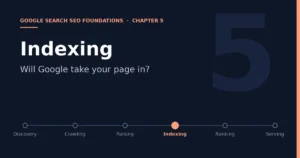
Chapter 5: Indexing — Does Google Decide to Take In Your Page?

- 6 min read
- 0
At this station, Google already knows about the page, has retrieved it, and has understood it. Now it must make a decision.
Discovery → Crawling → Parsing/Understanding → Indexing → Ranking → Serving
Indexing does not happen automatically. The official documentation says explicitly that not every page Google processes will be indexed.
1. What the Official Documentation Actually Says About Indexing
The official definition of indexing is that after a page is crawled, Google tries to understand its content. This stage involves processing and analyzing the page’s text, key tags and attributes, while also determining whether the page is a duplicate of another page on the internet and which one is the canonical page. The canonical page is the one that may appear in search results. Google also collects signals about the canonical page, such as the page’s language, the country or region its content targets, and the page’s usability, and these signals are used in the next stage to decide how to display it. The collected information may be stored in the Google index, a large database hosted on thousands of computers. The official documentation adds a crucial sentence here: indexing is not guaranteed.
The official documentation lists three common categories of indexing problems: low-quality page content, robots meta rules that do not allow indexing, and website design that makes indexing difficult. This means that when a page is not indexed in Search Console, the cause is often not crawling but content quality, conflicting directives, or page design.
2. Duplicate Content, Clustering, and Canonical URLs
The official canonicalization documentation explains how Google handles duplicate content. It first determines the centerpiece content of each page, and if multiple pages look identical or their centerpiece content is very similar, it groups them together, which is also called clustering. Google then uses the signals collected during indexing to choose the page that is objectively the most complete and most useful to search users, and marks it as the canonical page. The canonical page is crawled most often, while duplicates are crawled less, to reduce the crawl burden on the site. The documentation specifically notes that some duplicate content on a website is normal and does not violate spam policies, but having the same content accessible through many URLs confuses users and makes it harder for you to track how the content performs in search.
Find similar pages → Cluster → Collect signals → Select canonical page → Only the canonical page may be shown
For site owners, the official documentation gives several ways to express a canonical URL preference, listed by strength of influence: redirects are a strong signal, the rel=”canonical” link annotation is also a strong signal, and including a URL in a Sitemap is a weaker signal. These methods can be combined, and using them together increases the chance that your preferred canonical URL is chosen. But the official documentation also stresses that none of these methods is required, and a website that specifies no canonical preference usually still works well. In addition, the official troubleshooting page mentions that even after content issues are fixed, Google may keep a page in a duplicate cluster for up to two weeks, and a page will be split out faster only if it differs enough from the other pages in the cluster.
For an accessories site, the easiest way to trigger clustering is multiple near-identical pages for the same accessory generated by color, specification, or parameter ordering.
3. noindex: Explicitly Telling Google Not to Index
The standard way to keep a page from appearing in Google Search is noindex. It can be placed in a robots meta tag in the page head, or implemented through an X-Robots-Tag response header, the latter being suitable for non-HTML resources such as PDFs, images, and videos. The official documentation explains that when Googlebot crawls the page and extracts this rule, it removes the page from Google Search results entirely, regardless of whether other websites link to it. There is a very classic trap here: for noindex to take effect, the page must not be blocked by robots.txt, because if the crawler cannot get in, it will never see the noindex directive, and the page may even continue to appear in search results because it is linked from elsewhere. This is also the technical root of why Chapter 1 repeatedly stressed that robots.txt and noindex must not be confused. The official documentation also reminds us that if noindex does not seem to be working, it may simply be that Google has not recrawled the page yet. Pages of low importance may take several months to be revisited, and you can use the URL Inspection tool to request a recrawl.
4. Two Common Statuses in Search Console
In the page indexing report, there are two not-indexed statuses that look similar but mean different things. “Discovered – currently not indexed” usually means Google knows the URL exists but has not crawled it yet, which may be because crawling was postponed or may be related to the site’s overall crawl situation. “Crawled – currently not indexed” means Google has crawled and evaluated the page but decided not to put it in the index for now. Common reasons include low content quality, limited page value, weak internal links, and possibly rendering problems that prevented Google from seeing the main content of the page. For the specific meaning of these two statuses, please refer to the latest explanation in the Search Console Help documentation; the summary here is mainly meant to build a diagnostic approach. The diagnostic focus for the former is discovery and crawl efficiency; for the latter it is content value and page readability.
5. A 200 Status Code Does Not Mean the Page Will Be Indexed
The official status code documentation states clearly that, for Google Search, HTTP 2xx success status codes do not guarantee indexing. A soft 404 is a typical example: the page returns 200, but its content is actually a “page not found” message, and it will likewise be excluded. For an accessories site, handling delisted and out-of-stock product pages requires special care. If a page merely displays a line saying the product is discontinued but still returns 200, Google will very likely treat it as a soft 404, wasting crawl resources and also dragging down the overall impression of the site’s page quality.
6. A Checklist for the Roborock Accessories Site
First, use the page indexing report to view non-indexed pages by reason, and first distinguish “discovered” from “crawled.” Second, for pages you do not want in search, such as the cart, account pages, and internal search result pages, use noindex and confirm they are not blocked by robots.txt. Third, for multiple near-identical pages of the same accessory, use redirects, canonical URL annotations, and consistent internal linking to clearly specify which one is the primary version. Fourth, for delisted or permanently unavailable product pages, return the correct status code rather than 200 plus a notice. Fifth, for key product pages that are crawled but not indexed, go back and check whether the content is only a one-sentence description, and whether it has been filled out with genuinely valuable information such as compatible models, specifications, installation instructions, and warranty.
7. Chapter Summary
Being indexed only earns you a place in the competition; it does not mean you will rank, let alone bring traffic. Only after a page enters the index does it truly face every searcher’s query, and the next station is ranking.
Discovery → Crawling → Parsing/Understanding → Indexing → Ranking → Serving
References
· In-Depth Guide to How Google Search Works, developers.google.com/search/docs/fundamentals/how-search-works
· What Is URL Canonicalization, developers.google.com/search/docs/crawling-indexing/canonicalization
· How to Specify a Canonical URL, developers.google.com/search/docs/crawling-indexing/consolidate-duplicate-urls
· Fix Canonicalization Issues, developers.google.com/search/docs/crawling-indexing/canonicalization-troubleshooting
· Block Search Indexing with noindex, developers.google.com/search/docs/crawling-indexing/block-indexing
· Robots Meta Tags Specifications, developers.google.com/search/docs/crawling-indexing/robots-meta-tag
· How HTTP Status Codes Affect Google’s Crawlers, developers.google.com/search/docs/crawling-indexing/http-network-errors