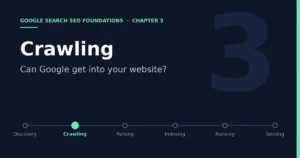
Chapter 3: Crawling — Can Google Get Into Your Website Smoothly?

- 7 min read
- 0
The previous chapter addressed whether Google knows a URL exists. This chapter moves along the chain to the second station.
Discovery → Crawling → Parsing/Understanding → Indexing → Ranking → Serving
This chapter is also written by cross-referencing Google Search Central’s official documentation, and there is really only one core question: once Google knows your URL, can it actually retrieve the page content?
1. What Is Crawling Actually Doing?
The official documentation describes crawling very directly: Google uses a huge cluster of computers to fetch pages from the internet, and the program that retrieves pages is called Googlebot, which is the crawler we often talk about. Googlebot uses a set of algorithms to decide which websites to crawl, how often, and how many pages to fetch from each site. It is also designed not to overwhelm websites, and its crawl rate adjusts automatically according to how the site responds; for example, if a server returns HTTP 500-type errors, that means it needs to slow down. There are two easily misunderstood points here. First, Google does not crawl every page it discovers. Some pages are blocked from crawling by site owners with robots.txt, and some pages require login to access; Googlebot cannot get the content of either. Second, the official documentation states clearly that Google does not accept payment to increase crawl frequency or rankings. Crawl resources are allocated by Google itself based on the condition of the website, and they cannot be bought.
Reference Link: https://developers.google.com/crawling/docs/troubleshooting/http-status-codes?hl=zh-tw
2. Who Is Googlebot, and What Are Its Characteristics?
According to the official description of Googlebot, it comes in two subtypes, smartphone and desktop. For most websites, Google Search mainly indexes the mobile version of the content, so the vast majority of crawl requests come from the smartphone crawler, and the desktop crawler accounts for only a small share. The two subtypes use the same product token in robots.txt, so there is no way to set rules for just one of them. For most websites, Googlebot on average does not visit more often than once every few seconds. In addition, when Googlebot crawls for Google Search, it processes only the first 2MB of supported file types, and the first 64MB for PDF files. This means that if an HTML page is unusually large, the content toward the end may not be processed at all. The official documentation also warns that Googlebot’s User-Agent is often forged by other crawlers, so when you encounter a suspicious request, you should verify whether it really comes from Google using the method the official documentation provides, rather than relying only on the User-Agent string.
The official documentation separates three common needs clearly in one sentence: to stop Googlebot from crawling a page, use robots.txt; to keep a page from being indexed, use noindex; to make a page completely inaccessible to both crawlers and users, use other methods such as password protection. These three things belong to crawling, indexing, and access control respectively and cannot be mixed. This is exactly why Chapter 1 stressed that robots.txt and noindex must not be confused.
3. robots.txt Controls Crawling, Not Indexing
robots.txt is a text file placed in the root directory of a website. It tells crawlers which paths they may access and which they should not. In the file, the User-agent line specifies which crawler a rule applies to, Disallow lines list paths that may not be crawled, Allow lines list paths that may be crawled, and a Sitemap line can conveniently declare the location of the Sitemap. When parsing, Google selects the most specific matching group of rules for a given crawler and ignores the other groups; the order of groups in the file does not matter. The official introduction page has several limitations worth remembering. First, robots.txt is mainly used to avoid overloading your site with requests; it is not a mechanism for keeping a page out of Google. Second, it cannot force crawlers to comply. Legitimate crawlers such as Googlebot obey it, but other crawlers may not, so to protect sensitive content you should use password protection rather than relying on robots.txt. Third, if a page blocked from crawling by robots.txt is linked from elsewhere, Google may still index the URL, and search results may show only the address and public information such as the anchor text of links pointing to it.
For e-commerce sites, there is also a very practical pitfall. The official examples specifically mention that if a site’s CSS and JS resource directories are blocked wholesale, while Google needs those files to render pages, you should explicitly allow Googlebot to access them. Blocking the scripts and styles required for rendering in robots.txt will directly affect the parsing and understanding covered in the next chapter.
4. HTTP Status Codes, Network Errors, and DNS Errors
When Googlebot requests a URL, it goes through the following path, and a problem at any link will affect crawling.
DNS resolution → Establish network connection → Server returns status code → Return page content
The official documentation “HTTP Status Codes, Network and DNS Errors, and Google Search” gives clear handling for each kind of result. 2xx means the request succeeded and the page content may be considered for indexing, but the official documentation stresses that 2xx does not guarantee indexing. 3xx is a redirect. Googlebot follows up to 10 redirect hops, and beyond that Search Console reports a redirect error. Among them, 301 is a stronger signal indicating that the redirect target should be the canonical URL, while 302 and 303 are weaker signals. 4xx causes the URL to be excluded from the index, and a soft 404, which returns 200 but is actually an error page, is likewise excluded. 5xx causes Google to slow down crawling, and if it persists, already indexed pages may eventually be removed. Network timeouts, connection resets, and DNS errors are handled by Google in a way similar to 5xx, and can quickly have a negative effect on the URL’s performance in search. The documentation also specifically reminds you to check firewall rules when troubleshooting these problems, to make sure Googlebot’s IPs have not been blocked by mistake.
For an accessories site, the most dangerous thing is often not a problem with the page itself, but a CDN, firewall, or security plugin treating Googlebot as malicious traffic and keeping it out.
5. Crawl Budget: When Do You Need to Care?
Crawl budget is a concept many people like to talk about but which is easily exaggerated. The official crawl budget documentation explains that the crawl resources Google allocates to each website depend on the site’s popularity, its value to users, the uniqueness of its content, and the capacity of its servers. There are only two ways to increase crawl budget: increase the server’s capacity to handle crawling and, more importantly, increase the value of the site’s content to searchers. The documentation also says that if a website does not have many pages, or its pages are basically crawled the same day they are published, there is no need to study this guide specifically. For most websites, keeping the Sitemap updated and regularly checking the page indexing report is enough.
But for sites with a very large number of pages and frequent updates, the official direction is to manage your URL inventory. Concrete steps include consolidating duplicate content so that crawling focuses on unique content rather than unique URLs, and using robots.txt to block URLs that do not need to be crawled, such as infinite-scroll pages with duplicate content, or the same page that differs only in sort order. In an e-commerce scenario, a filtered navigation that keeps producing new URLs through combinations of model, color, and price sorting can easily generate large numbers of URLs with nearly identical content. If Google spends a lot of time on URLs that should not enter the index, it may conclude that the rest of the site is not worth the time, and may even be unwilling to raise the crawl budget.
6. How to Verify Whether There Are Crawling Problems
You can verify crawl status in three places. The first is Search Console’s URL Inspection tool. Expanding the page indexing details shows the crawl time and any obstacles encountered during crawling, and you can also view the crawled page, including the HTTP request and response and the returned HTML. The second is the Crawl Stats report, located in Search Console’s settings, which shows the number of crawl requests, server response times, and the distribution by response type. The official documentation also recommends using it to check whether the site had availability problems during crawling. The third is server logs. Logs record every Googlebot visit and can show which pages are crawled frequently and which have never been crawled.
7. A Crawling Checklist for the Roborock Accessories Site
First, open the site’s robots.txt and confirm that it has not mistakenly blocked the product directory, category pages, or the scripts and styles required for rendering. Second, check whether the CDN, WAF, and security plugins are blocking or rate-limiting Googlebot, and if necessary verify Googlebot’s real IPs using the official method. Third, spot-check the HTTP status codes of new product pages and key pages, and confirm they return 200, with no soft 404s and no overly long redirect chains. Fourth, if the site has filter pages sorted by model, color, or price, evaluate whether they are creating large numbers of near-duplicate URLs, and control them sensibly with canonical URLs and robots.txt. Fifth, regularly watch server response times and error ratios in the Crawl Stats report, and when something looks abnormal, check the server first and then the content.
8. Chapter Summary
Crawling solves the problem of whether Google can get in, not whether it will index the page. Only after a page has been crawled successfully does Google have a chance to look at what it actually is, and that is the next station on the chain.
Discovery → Crawling → Parsing/Understanding → Indexing → Ranking → Serving
References
· In-Depth Guide to How Google Search Works, developers.google.com/search/docs/fundamentals/how-search-works
· What Is Googlebot, developers.google.com/search/docs/crawling-indexing/googlebot
· Introduction to robots.txt, developers.google.com/search/docs/crawling-indexing/robots/intro
· How Google Interprets the robots.txt Specification, developers.google.com/crawling/docs/robots-txt/robots-txt-spec
· HTTP Status Codes, Network and DNS Errors, and Google Search, developers.google.com/search/docs/crawling-indexing/http-network-errors
· Crawl Budget Management, developers.google.com/crawling/docs/crawl-budget
· URL Inspection tool, support.google.com/webmasters/answer/9012289